# Remote-Wake-Sleep-On-LAN-Docker
A docker image of [sciguy14/Remote-Wake-Sleep-On-LAN-Server](https://github.com/sciguy14/Remote-Wake-Sleep-On-LAN-Server).
Dockerhub: https://hub.docker.com/r/ex0nuss/remote-wake-sleep-on-lan-docker
Weekly updated :)
## Summary
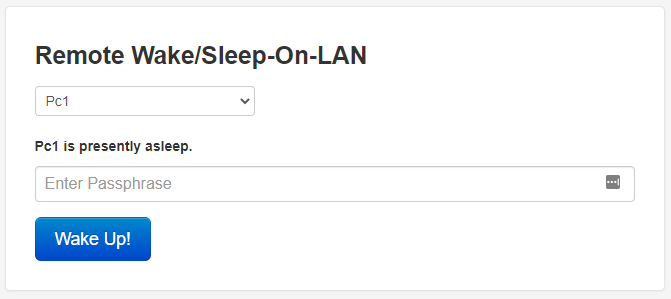
> The Remote Wake/Sleep-on-LAN Server (RWSOLS) is a simple webapp that runs on Docker to remotely power up any computer via WOL. This is necesarry, since WOL packages (Layer 2) cannot be forwarded via a normal VPN (Layer 3).
**Information:**
- You don't need any additonal software to wake your client via WOL.
- Additional software is needed to sleep/shutdown your client via this webinterface.
## Usage
Here are some example snippets to help you get started creating a container.
### docker-compose (recommended)
```YAML
version: "3"
services:
frontend-rwsols:
image: ex0nuss/remote-wake-sleep-on-lan-docker
container_name: frontend-rwsols
restart: unless-stopped
network_mode: host
environment:
- APACHE2_PORT=8080
- PASSPHRASE=MyPassword
- RWSOLS_COMPUTER_NAME="Pc1","Pc2"
- RWSOLS_COMPUTER_MAC="XX:XX:XX:XX:XX:XX","XX:XX:XX:XX:XX:XX"
- RWSOLS_COMPUTER_IP="192.168.1.45","192.168.1.50"
```
### docker CLI
```
docker run -d \
--name=frontend-rwsols \
--network="host" \
-e APACHE2_PORT=8080 \
-e PASSPHRASE=MyPassword \
-e 'RWSOLS_COMPUTER_NAME="Pc1","Pc2"' \
-e 'RWSOLS_COMPUTER_MAC="XX:XX:XX:XX:XX:XX","XX:XX:XX:XX:XX:XX"' \
-e 'RWSOLS_COMPUTER_IP="192.168.1.45","192.168.1.50"' \
--restart unless-stopped \
ex0nuss/remote-wake-sleep-on-lan-docker
```
## Parameters and environment variables
Container images are configured using parameters passed at runtime (such as those above). There is no config file needed.
Parameter / Env var | Optional | Default value | Description
------------ | :-------------: | ------------- | -------------
`network_mode: host` | no | / | The container’s network stack is not isolated from the Docker host. This is necessary to send WOL packages from a container. The port of the webserver is configured via `APACHE2_PORT`.
`APACHE2_PORT` | yes | 8080 | Port of the webinterface.
`PASSPHRASE` | yes | admin | Password of the webinterface. If no password is specified, you don't need a password to wake a PC.
`RWSOLS_COMPUTER_NAME` | no | / | Displaynames for the computers (**array**)
`RWSOLS_COMPUTER_MAC` | no | / | MAC addresses for the computers (**array**)
`RWSOLS_COMPUTER_IP` | no | / | IP addresses for the computers (**array**)
`RWSOLS_SLEEP_PORT` | yes | 7760 | This is the Port being used by the Windows SleepOnLan Utility to initiate a Sleep State (**not necessary for WOL**)
`RWSOLS_SLEEP_CMD` | yes | suspend | Command to be issued by the windows sleeponlan utility (**not necessary for WOL**)
#### Explanation: Configuring the destination computer name, MAC and IP
To configure the computers, we will use these three environment variables:
- `RWSOLS_COMPUTER_NAME`
- `RWSOLS_COMPUTER_MAC`
- `RWSOLS_COMPUTER_IP`
Let's say we want to wake 2 computers with the following configurations:
1. PC1
- Displayname: PC of Mark
- MAC address: 24:00:dd:5a:21:04
- IP address: 192.168.1.146
2. PC2
- Displayname: PC of John
- MAC address: 59:3c:45:3c:30:f6
- IP address: 192.168.1.177
To configure the env vars it's easier to arrange them in a **vertical** table:
>
>
> RWSOLS_COMPUTER_NAME |
> PC of Mark |
> PC of John |
>
>
> RWSOLS_COMPUTER_MAC |
> 24:00:dd:5a:21:04 |
> 59:3c:45:3c:30:f6 |
>
>
> RWSOLS_COMPUTER_IP |
> 192.168.1.146 |
> 192.168.1.177 |
>
>
Now you just format the table in an array:
>```
> - RWSOLS_COMPUTER_NAME="PC of Mark","PC of John"
> - RWSOLS_COMPUTER_MAC="24:00:dd:5a:21:04","59:3c:45:3c:30:f6"
> - RWSOLS_COMPUTER_IP="192.168.1.146","192.168.1.177"
>```
>It's important to use the format as shown: `Env_var="XXX","XXX"`