Compare commits
10
Commits
| Author | SHA1 | Date | |
|---|---|---|---|
 nico nico
|
28caad311f | ||
 ex0nuss ex0nuss
|
acac39b229 | ||
|
ex0nuss
|
cb2315bb40 | ||
|
ex0nuss
|
c066f7a5d4 | ||
|
ex0nuss
|
c71f8ca12a | ||
|
ex0nuss
|
9de99ebd8a | ||
|
ex0nuss
|
a16ccfb155 | ||
|
ex0nuss
|
62381f95c2 | ||
|
ex0nuss
|
4a40f0f052 | ||
|
ex0nuss
|
ec58c2091f |
No files matched your search
@@ -1,13 +1,18 @@
|
||||
:warning: **This repo is currently no longer maintained, feel free to fork it tho :)**
|
||||
# Remote-Wake-Sleep-On-LAN-Docker
|
||||
A docker image of [sciguy14/Remote-Wake-Sleep-On-LAN-Server](https://github.com/sciguy14/Remote-Wake-Sleep-On-LAN-Server).
|
||||
|
||||
Dockerhub: https://hub.docker.com/r/ex0nuss/remote-wake-sleep-on-lan-docker
|
||||
|
||||
> **Security:** The image is based on PHP 8.5.12 or newer (Apache) and includes fixes for the critical remote code execution vulnerabilities [CVE-2026-109618](https://github.com/php/php-src/security/advisories/GHSA-w8hw-w9fx-j79w) and [CVE-2026-109619](https://github.com/php/php-src/security/advisories/GHSA-6wmf-4rv5-p3rp). Rebuild the image regularly (for example with `docker build --pull`) to receive future PHP security updates.
|
||||
|
||||
Weekly updated :)
|
||||
|
||||
## Summary
|
||||
|
||||
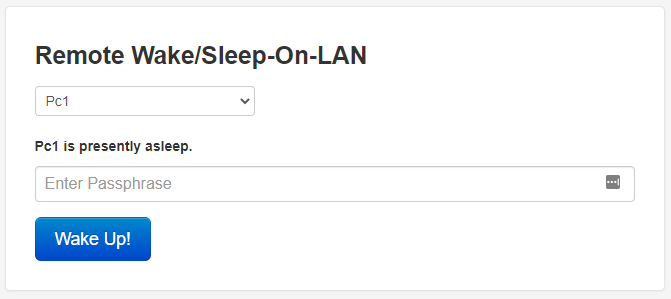
> The Remote Wake/Sleep-on-LAN Server (RWSOLS) is a simple webapp that runs on Docker to remotely power up any computer via WOL. </br> This is necesarry, since WOL packages (Layer 2) cannot be forwarded via a normal VPN (Layer 3).
|
||||
|
||||

|
||||
|
||||
|
||||
**Information:**
|
||||
- You don't need any additonal software to wake your client via WOL.
|
||||
@@ -41,9 +46,9 @@ docker run -d \
|
||||
--network="host" \
|
||||
-e APACHE2_PORT=8080 \
|
||||
-e PASSPHRASE=MyPassword \
|
||||
-e RWSOLS_COMPUTER_NAME="Pc1","Pc2" \
|
||||
-e RWSOLS_COMPUTER_MAC="XX:XX:XX:XX:XX:XX","XX:XX:XX:XX:XX:XX" \
|
||||
-e RWSOLS_COMPUTER_IP="192.168.1.45","192.168.1.50" \
|
||||
-e 'RWSOLS_COMPUTER_NAME="Pc1","Pc2"' \
|
||||
-e 'RWSOLS_COMPUTER_MAC="XX:XX:XX:XX:XX:XX","XX:XX:XX:XX:XX:XX"' \
|
||||
-e 'RWSOLS_COMPUTER_IP="192.168.1.45","192.168.1.50"' \
|
||||
--restart unless-stopped \
|
||||
ex0nuss/remote-wake-sleep-on-lan-docker
|
||||
```
|
||||
@@ -53,14 +58,14 @@ Container images are configured using parameters passed at runtime (such as thos
|
||||
|
||||
Parameter / Env var | Optional | Default value | Description
|
||||
------------ | :-------------: | ------------- | -------------
|
||||
`network_mode: host` | no | / | The container’s network stack is not isolated from the Docker host. This is necessary to send WOL packages from a container. The port of the webserver is configures via `APACHE2_PORT`.
|
||||
`network_mode: host` | no | / | The container’s network stack is not isolated from the Docker host. This is necessary to send WOL packages from a container. The port of the webserver is configured via `APACHE2_PORT`.
|
||||
`APACHE2_PORT` | yes | 8080 | Port of the webinterface.
|
||||
`PASSPHRASE` | yes | admin | Password of the webinterface.
|
||||
`RWSOLS_COMPUTER_NAME` | no | / | Displaynames for the computers (**array**)
|
||||
`PASSPHRASE` | yes | admin | Password of the webinterface. If no password is specified, you don't need a password to wake a PC.
|
||||
`RWSOLS_COMPUTER_NAME` | no | / | Displaynames for the computers (**array**)<br>(**No spaces supported.** Please use hyphens or underscores)
|
||||
`RWSOLS_COMPUTER_MAC` | no | / | MAC addresses for the computers (**array**)
|
||||
`RWSOLS_COMPUTER_IP` | no | / | IP addresses for the computers (**array**)
|
||||
`RWSOLS_SLEEP_PORT` | yes | 7760 | This is the Port being used by the Windows SleepOnLan Utility to initiate a Sleep State (**not necessary for WOL only**)
|
||||
`RWSOLS_SLEEP_CMD` | yes | suspend | Command to be issued by the windows sleeponlan utility (**not necessary for WOL only**)
|
||||
`RWSOLS_SLEEP_PORT` | yes | 7760 | This is the Port being used by the Windows SleepOnLan Utility to initiate a Sleep State (**not necessary for WOL**)
|
||||
`RWSOLS_SLEEP_CMD` | yes | suspend | Command to be issued by the windows sleeponlan utility (**not necessary for WOL**)
|
||||
|
||||
#### Explanation: Configuring the destination computer name, MAC and IP
|
||||
To configure the computers, we will use these three environment variables:
|
||||
@@ -72,22 +77,22 @@ To configure the computers, we will use these three environment variables:
|
||||
|
||||
Let's say we want to wake 2 computers with the following configurations:
|
||||
1. PC1
|
||||
- Displayname: PC of Mark
|
||||
- Displayname: PC-of-Mark
|
||||
- MAC address: 24:00:dd:5a:21:04
|
||||
- IP address: 192.168.1.146
|
||||
2. PC2
|
||||
- Displayname: PC of John
|
||||
- Displayname: PC-of-John
|
||||
- MAC address: 59:3c:45:3c:30:f6
|
||||
- IP address: 192.168.1.177
|
||||
|
||||
<br/>
|
||||
|
||||
To configure the env vars it's easier to imagine them in a **vertical** table:
|
||||
To configure the env vars it's easier to arrange them in a **vertical** table:
|
||||
><table>
|
||||
> <tr>
|
||||
> <th><code>RWSOLS_COMPUTER_NAME</code></th>
|
||||
> <td>PC of Mark</td>
|
||||
> <td>PC of John</td>
|
||||
> <td>PC-of-Mark</td>
|
||||
> <td>PC-of-John</td>
|
||||
> </tr>
|
||||
> <tr>
|
||||
> <th><code>RWSOLS_COMPUTER_MAC</code></th>
|
||||
@@ -105,7 +110,7 @@ To configure the env vars it's easier to imagine them in a **vertical** table:
|
||||
|
||||
Now you just format the table in an array:
|
||||
>```
|
||||
> - RWSOLS_COMPUTER_NAME="PC of Mark","PC of John"
|
||||
> - RWSOLS_COMPUTER_NAME="PC-of-Mark","PC-of-John"
|
||||
> - RWSOLS_COMPUTER_MAC="24:00:dd:5a:21:04","59:3c:45:3c:30:f6"
|
||||
> - RWSOLS_COMPUTER_IP="192.168.1.146","192.168.1.177"
|
||||
>```
|
||||
|
||||
+5
-11
@@ -1,7 +1,7 @@
|
||||
<IfModule mod_ssl.c>
|
||||
<VirtualHost *:443>
|
||||
# TLS/SSL configuration, this is for the use of crypto.
|
||||
ServerAdmin webmaster@localhost
|
||||
ServerName localhost
|
||||
|
||||
SSLEngine On
|
||||
SSLCertificateFile /etc/apache2/ssl/wol.crt
|
||||
@@ -10,15 +10,12 @@
|
||||
DocumentRoot /var/www/html
|
||||
<Directory /var/www/html/>
|
||||
AllowOverride AuthConfig FileInfo
|
||||
Order allow,deny
|
||||
allow from all
|
||||
Options -Indexes
|
||||
Require all granted
|
||||
</Directory>
|
||||
|
||||
ErrorLog ${APACHE_LOG_DIR}/ssl_error.log
|
||||
|
||||
# Possible values include: debug, info, notice, warn, error, crit,
|
||||
# alert, emerg.
|
||||
LogLevel error
|
||||
|
||||
CustomLog ${APACHE_LOG_DIR}/ssl_access.log combined
|
||||
@@ -26,22 +23,19 @@
|
||||
</VirtualHost>
|
||||
</IfModule>
|
||||
|
||||
<VirtualHost *:80>
|
||||
# Non-TLS/SSL configuration.
|
||||
<VirtualHost *:8080>
|
||||
ServerAdmin webmaster@localhost
|
||||
ServerName localhost
|
||||
|
||||
DocumentRoot /var/www/html
|
||||
<Directory /var/www/html/>
|
||||
AllowOverride AuthConfig FileInfo
|
||||
Order allow,deny
|
||||
allow from all
|
||||
Options -Indexes
|
||||
Require all granted
|
||||
</Directory>
|
||||
|
||||
ErrorLog ${APACHE_LOG_DIR}/error.log
|
||||
|
||||
# Possible values include: debug, info, notice, warn, error, crit,
|
||||
# alert, emerg.
|
||||
LogLevel error
|
||||
|
||||
CustomLog ${APACHE_LOG_DIR}/access.log combined
|
||||
|
||||
+25
-33
@@ -1,42 +1,34 @@
|
||||
FROM ubuntu:latest
|
||||
MAINTAINER ex0nuss
|
||||
FROM php:8.5-apache
|
||||
|
||||
## for apt to be noninteractive
|
||||
ENV DEBIAN_FRONTEND noninteractive
|
||||
ENV DEBCONF_NONINTERACTIVE_SEEN true
|
||||
RUN php -r 'if (version_compare(PHP_VERSION, "8.5.12", "<")) { fwrite(STDERR, "PHP 8.5.12 or newer is required\n"); exit(1); }'
|
||||
|
||||
RUN apt-get -y update && \
|
||||
apt install -y \
|
||||
apache2 \
|
||||
php \
|
||||
libapache2-mod-php \
|
||||
libcurl4-gnutls-dev \
|
||||
iputils-ping \
|
||||
wakeonlan \
|
||||
git
|
||||
ENV DEBIAN_FRONTEND=noninteractive
|
||||
|
||||
WORKDIR /root
|
||||
RUN git clone https://github.com/sciguy14/Remote-Wake-Sleep-On-LAN-Server.git &&\
|
||||
chown root: /var/www/html &&\
|
||||
chmod u+s `which ping`
|
||||
RUN apt-get update && \
|
||||
apt-get install -y --no-install-recommends \
|
||||
ca-certificates \
|
||||
git \
|
||||
iputils-ping \
|
||||
wakeonlan && \
|
||||
rm -rf /var/lib/apt/lists/* && \
|
||||
chmod u+s "$(command -v ping)"
|
||||
|
||||
COPY ports.conf /etc/apache2/
|
||||
RUN git clone --depth 1 --branch 3.5.0 https://github.com/sciguy14/Remote-Wake-Sleep-On-LAN-Server.git /tmp/rwsols && \
|
||||
cp -a /tmp/rwsols/www/html/. /var/www/html/ && \
|
||||
rm -rf /tmp/rwsols && \
|
||||
rm -f /var/www/html/config_sample.php /var/www/html/index.html && \
|
||||
sed -i '/curl_close(/d' /var/www/html/index.php
|
||||
|
||||
RUN a2enmod headers &&\
|
||||
service apache2 restart &&\
|
||||
mv -f Remote-Wake-Sleep-On-LAN-Server/000-default.conf /etc/apache2/sites-available/000-default.conf &&\
|
||||
sed -i.bak "s/expose_php = On/expose_php = Off/g" /etc/php/7.4/apache2/php.ini &&\
|
||||
sed -i.bak "s/E_ALL & ~E_NOTICE & ~E_STRICT & ~E_DEPRECATED/error_reporting = E_ERROR/g" /etc/php/7.4/apache2/php.ini &&\
|
||||
sed -i.bak "s/ServerSignature On/ServerSignature Off/g" /etc/apache2/conf-available/security.conf &&\
|
||||
sed -i.bak "s/ServerTokens OS/ServerTokens Prod/g" /etc/apache2/conf-available/security.conf &&\
|
||||
service apache2 restart &&\
|
||||
mv Remote-Wake-Sleep-On-LAN-Server/* /var/www/html &&\
|
||||
mv Remote-Wake-Sleep-On-LAN-Server/.htaccess /var/www/html &&\
|
||||
rm -rf Remote-Wake-Sleep-On-LAN-Server/ &&\
|
||||
rm -f /var/www/html/index.html
|
||||
COPY 000-default.conf /etc/apache2/sites-available/000-default.conf
|
||||
COPY ports.conf /etc/apache2/ports.conf
|
||||
COPY php-security.ini /usr/local/etc/php/conf.d/zz-security.ini
|
||||
COPY config.php /usr/local/share/rwsols-config.php
|
||||
COPY entrypoint.sh /entrypoint.sh
|
||||
|
||||
COPY config.php /var/www/html/config.php
|
||||
COPY entrypoint.sh /
|
||||
RUN chmod +x /entrypoint.sh && \
|
||||
a2enmod headers && \
|
||||
sed -i 's/^ServerTokens .*/ServerTokens Prod/; s/^ServerSignature .*/ServerSignature Off/' /etc/apache2/conf-available/security.conf && \
|
||||
echo 'ServerName localhost' >> /etc/apache2/apache2.conf
|
||||
|
||||
ENV APACHE2_PORT=80
|
||||
ENV PASSPHRASE=admin
|
||||
|
||||
+2
-3
@@ -12,10 +12,9 @@
|
||||
// Set the below to "true" (no quotes) to enforce HTTPS connections (don't forget to create a self-signed cert and enable it in Apache2)
|
||||
$USE_HTTPS = false;
|
||||
|
||||
// Choose a passphrase and find the sha256 hash of that passphrase.
|
||||
// You can use an online calculator to generate the hash: http://www.xorbin.com/tools/sha256-hash-calculator.
|
||||
// The password hash is generated automatically at container startup from the PASSPHRASE environment variable.
|
||||
// Unless you are using an SSL connection to your server, remember that passphrases can still be obtained via a man-in-the-middle attack.
|
||||
$APPROVED_HASH = "RWSOLS_HASH";
|
||||
$APPROVED_HASH = 'REPLACE_APPROVED_HASH';
|
||||
|
||||
// This is the number of times that the WOL server will try to ping the target computer to check if it has woken up. Default = 15.
|
||||
$MAX_PINGS = REPLACE_RWSOLS_MAX_PINGS;
|
||||
|
||||
+25
-19
@@ -1,33 +1,39 @@
|
||||
#!/bin/bash
|
||||
|
||||
#File to edit
|
||||
set -eu
|
||||
|
||||
template='/usr/local/share/rwsols-config.php'
|
||||
file='/var/www/html/config.php'
|
||||
|
||||
#Searches $1 and replaces with $2 in $file
|
||||
function search_and_replace {
|
||||
sed -i 's|'$1'|'$2'|g' "$file"
|
||||
cp "$template" "$file"
|
||||
|
||||
search_and_replace() {
|
||||
local search="$1"
|
||||
local replace="$2"
|
||||
local escaped
|
||||
|
||||
escaped=$(printf '%s' "$replace" | sed -e 's/[&|\\]/\\&/g')
|
||||
sed -i "s|$search|$escaped|g" "$file"
|
||||
}
|
||||
|
||||
#RWSOLS
|
||||
#Does everything for ENV-vars with RWSOLS_*
|
||||
compgen -A variable RWSOLS_ | while read v; do
|
||||
#Checks if REPLACE_envvar is in $file
|
||||
for v in $(compgen -A variable RWSOLS_); do
|
||||
if grep -q "REPLACE_$v" "$file"; then
|
||||
echo "search_and_replace REPLACE_$v with ${!v}"
|
||||
search_and_replace REPLACE_$v ${!v}
|
||||
search_and_replace "REPLACE_$v" "${!v}"
|
||||
fi
|
||||
done
|
||||
|
||||
#Settings RWSOLS_HASH for keyphrase
|
||||
RWSOLS_HASH=$(echo -n $PASSPHRASE | sha256sum | cut -d " " -f 1)
|
||||
search_and_replace RWSOLS_HASH $RWSOLS_HASH
|
||||
RWSOLS_HASH=$(php -r '$p = getenv("PASSPHRASE"); echo password_hash($p === false ? "" : $p, PASSWORD_DEFAULT);')
|
||||
search_and_replace "REPLACE_APPROVED_HASH" "$RWSOLS_HASH"
|
||||
|
||||
case "${APACHE2_PORT:-}" in
|
||||
''|*[!0-9]*)
|
||||
echo "APACHE2_PORT must be a numeric port" >&2
|
||||
exit 1
|
||||
;;
|
||||
esac
|
||||
|
||||
#APACHE2 port mapping
|
||||
echo "search_and_replace port 8080 with $APACHE2_PORT"
|
||||
sed -i 's|'8080'|'$APACHE2_PORT'|g' '/etc/apache2/ports.conf'
|
||||
echo "Starting Apache2 on port $APACHE2_PORT"
|
||||
sed -i "s|8080|$APACHE2_PORT|g" /etc/apache2/ports.conf /etc/apache2/sites-available/000-default.conf
|
||||
|
||||
|
||||
#Starting apache2
|
||||
echo "Starting Apache2: /usr/sbin/apache2ctl -D FOREGROUND"
|
||||
/usr/sbin/apache2ctl -D FOREGROUND
|
||||
exec apache2-foreground
|
||||
@@ -0,0 +1,13 @@
|
||||
expose_php = Off
|
||||
display_errors = Off
|
||||
display_startup_errors = Off
|
||||
log_errors = On
|
||||
error_reporting = E_ALL & ~E_DEPRECATED
|
||||
output_buffering = 4096
|
||||
|
||||
session.upload_progress.enabled = Off
|
||||
session.use_strict_mode = On
|
||||
fatal_error_backtraces = 0
|
||||
|
||||
post_max_size = 8M
|
||||
upload_max_filesize = 2M
|
||||
Reference in new issue
Block a user